Dine – Elegant Restaurant WordPress Theme
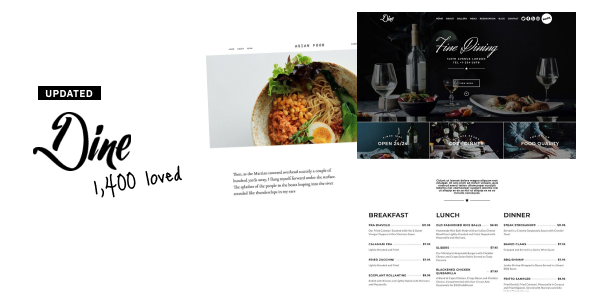
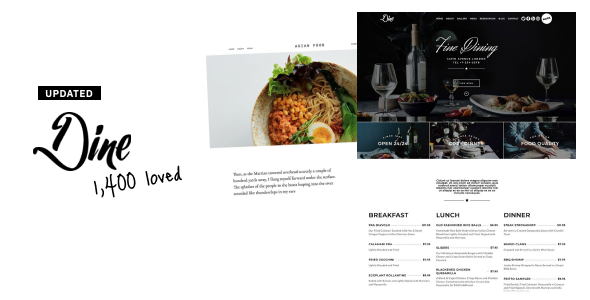
Dine is a comprehensive restaurant solution for WordPress — restaurants, bars, pubs, bakeries, pizzerias, cafés, bistros and coffee shops. Prebuilt exquisite templates to build a fancy yet elegant restaurant website, with extensive functionality like online ordering, reservation and booking, plus beautiful galleries and menus.
- Current version: v4.2.3 – Aug 09, 2026 (changelog)
- Live demo: dine.themepreview.site
- Online docs: themedocs.github.io/dine
- Support: heronwp.support-desk.site

Elementor + 20 addons
Dine uses Elementor as its page builder, so if you already know Elementor — or any page builder — there is zero learning curve. Dine adds its own elements on top to make building a restaurant site easier: Food Menu, Gallery, Booking, Forms, Navigation, Logo, Posts, Imagebox, Arctext, Diamond, Heading and more. You do not need Elementor Pro.

Reservation & booking
Dine integrates the Restaurant Reservations plugin, so you can add a reservation form to your site and see your customer list right inside your WordPress dashboard. No need to rely on a third-party booking service like OpenTable. View sample reservation form

Online ordering with WooCommerce
Selling online is easy with Dine. It supports WooCommerce, with prebuilt shop demos — pizza, burgers and delivery, or coffee bags, wine and dried nuts. WooCommerce is completely free, so there is nothing extra to buy. View sample shop

Beautiful menu & built-in gallery
The Dine food menu addon lets you build as many menus as you want — 1, 2 or 3 columns, with a name, description, price and image for each item. It’s real text, so Google can read and index it, unlike a PDF or a photo of your menu. The gallery addon showcases your food in grid or metro layout with a built-in lightbox — you only need to upload the photos. View sample menu | View sample gallery

Powerful theme options
Dine includes 1,500+ theme options — header layouts, footer layouts, backgrounds, typography and colour design options — so you can customise your restaurant website easily, live in the WordPress Customizer.

Easy demo import
Getting started is easy: pick any prebuilt demo in the backend, click once, wait about five minutes and your site looks 100% the same as the demo. 100% working, guaranteed by money-back.

Features
- WordPress 7.x compatible, and always kept compatible with the latest WordPress version
- PHP 7, 8
- Built with Elementor, the free and most popular page builder, plus 20 Dine addons. Elementor Pro not required
- 3 prebuilt demos, all included, all importable in one click
- Built-in food menu: 1, 2 or 3 columns, with name, description, price and image per item
- Total reservation control with Restaurant Reservations — bookings land in your own dashboard and inbox
- Online ordering & shop with WooCommerce
- Built-in gallery: grid or metro layout with lightbox and fullscreen option
- Large Elementor template library included, ready to drop into your pages
- Header & footer builder: build both with Elementor — logo left, logo centre, topbars, menus, buttons, off-canvas, transparent header, separate mobile header
- 1,500+ theme options: full typography and colour control from the Customizer. Switching the accent colour is one click
- Total typography control: system fonts, any Google Font (load only the weights you need) or upload your own font files
- Super-smooth parallax: 60fps using modern translate3d transforms and the jarallax framework
- Responsive and mobile friendly, on any device
- Retina-ready: all icons stay sharp on high-resolution screens
- SEO optimized: HTML5 & CSS3, compressed CSS/JS, properly organized headings
- Site layouts: wide (standard) or boxed with custom background colour and image
- Blog layouts: standard, grid and list
- Side navigation: small dots along the side of the page to help visitors navigate
- Transparent header and sticky header supported
- Multilingual: compatible with Polylang and WPML
- Translation ready: *.pot file included, works with Loco Translate and TranslatePress
- Plugins supported: Elementor, WooCommerce, Restaurant Reservations, Contact Form 7, Google Maps, WPML, Polylang, Loco Translate, TranslatePress
- Clean code & child theme included, easy to adapt
- GDPR compliant: Dine collects no personal data — no emails, no names, no IP addresses
- Free lifetime updates once purchased. No subscription, no recurring fee
- Well documented: themedocs.github.io/dine
FAQs
What’s included with my purchase of Dine?
The dine.zip WordPress theme file, all Elementor addons needed to build the demos, all current demos, all future demos at no additional cost, lifetime free updates, and top-notch support.
Are there any recurring fees?
No. There are no recurring licence fees for Dine. It is a one-time purchase, and you don’t need to pay to get future theme updates, features or demos. A licence comes with support included; if you’d like to keep getting support after that — or simply want to support the theme — you can renew, but it’s entirely optional.
What if I run into a problem with the theme?
After purchasing Dine you get access to a dedicated support desk. The theme author — with over ten years of WordPress experience, since 2013 — answers your questions directly and straight to the point. Most of the time one good answer solves the problem, instead of a long thread of unhelpful replies.
Do I need Elementor Pro?
No. Dine comes with its own Elementor addons, so you won’t need Elementor Pro to use it.
Can I use a feature from one demo in another demo?
Yes. All demos are just different configurations of a single theme: Dine. Any feature, layout or style you see in one demo can be used in any other — and you’re free to build your own design from scratch.
Credits
Icons and fonts: Font Awesome and Google Fonts.
Scripts: Flickity, Jarallax, imagesLoaded, Magnific Popup, FitVids.js, ScrollMagic, Waypoints, Tipsy, Superfish and Modernizr.
Images used on the demo sites are for demonstration only and are NOT included in the theme.
Changelog
View changelog: themedocs.github.io/dine/changelog
Support
Visit our support desk: heronwp.support-desk.site
Source